HTTP Demystified: Secrets of the Web
Explore the Protocol That Powers the Internet

Have you ever wondered how the Internet works behind the scenes? This article breaks down HTTP, the invisible framework powering the web, in a simple and engaging way. From how your browser talks to servers to cookies, caching, and the evolution of secure connections, you’ll discover the magic behind every click. Whether you’re a tech enthusiast or just curious about the Internet, this is your chance to uncover the secrets of the Web made easy for everyone!
Introduction to HTTP: The Language of the Web
HTTP stands for Hypertext Transfer Protocol. It is a set of rules (protocol) that helps a client (e.g. browser) and a server (e.g. website’s server) communicate and exchange information. “Hypertext” refers to structured text containing links to other resources, like web pages, images, or videos. HTTP allows transferring this linked information between a client and a server. It is one of the most impactful inventions, completely transforming how we connect and share information in the modern world.
The History and Evolution of HTTP
HTTP was developed by Tim Berners-Lee and his team at CERN in 1989 as part of the WorldWideWeb project, which aimed to facilitate the sharing and management of information over the Internet.
HTTP/0.9 (1989) - A simple, stateless protocol designed to transfer plain HTML files.
HTTP/1.0 (1996) - Allowed the transfer of multimedia content (e.g., images, videos, or other file types) over the web.
HTTP/1.1 (1997) - Added persistent connections and allowed multiple websites to share the same IP address.
HTTP/2 (2015) – As of January 2025, HTTP/2 is the most widely used HTTP protocol, powering approximately 34.5% of all websites. Its key features are as follows:
Fallback to HTTP/1.1: HTTP/1.1 is still used as an alternative when HTTP/2 isn’t supported.
Compression: Compresses large files to reduce their size, making data transfer faster.
Multiplexing: Allows multiple files to be processed and transferred at the same time over a single connection, improving speed and efficiency.
Encryption: Implements TLS (Transport Layer Security) for secure communication. A TLS certificate verifies the server’s identity, ensuring trust between the client and server. Encryption ensures data is readable only to the intended client and server by converting information into a coded format that others can’t decipher.
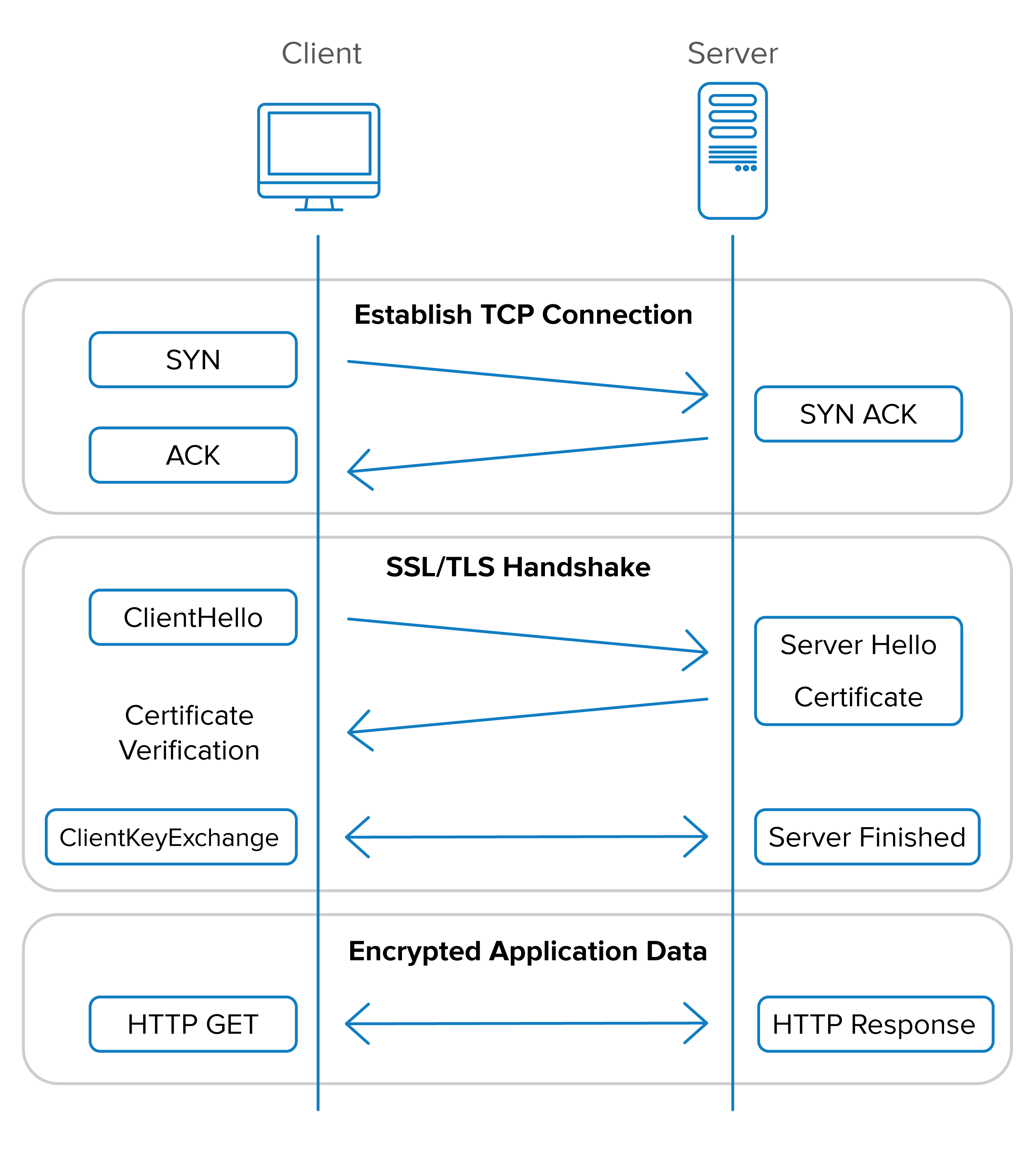
HTTP/3 (2018) - Uses QUIC (Quick UDP Internet Connections) instead of TCP (Transmission Control Protocol) as its transport protocol, providing faster performance, reduced latency, and improved security
Fun Question: Should we use HTTPS for internal communication between AWS (Amazon Web Services) servers?
Having explored the history of HTTP, we’ve only scratched the surface of its brilliance and its pivotal role in the modern web. While we’ve already touched on some of its features, there are still fascinating and essential aspects of HTTP to uncover. These intriguing features not only highlight its ingenuity but may also surprise you with their significance in shaping the internet we use today.
Stateless protocol
In HTTP, the server doesn’t retain any memory of previous requests once a request is completed. This means each request from the client (e.g., a browser) is treated independently, without knowledge of earlier interactions. An analogy to understand this is using an ATM: it processes your request (e.g., withdrawing money) based solely on the information you provide (insert card, enter PIN, select amount). Once the transaction is complete, the ATM doesn’t remember your session or transaction. Similarly, every HTTP request starts fresh, just like each user session at an ATM.
Session
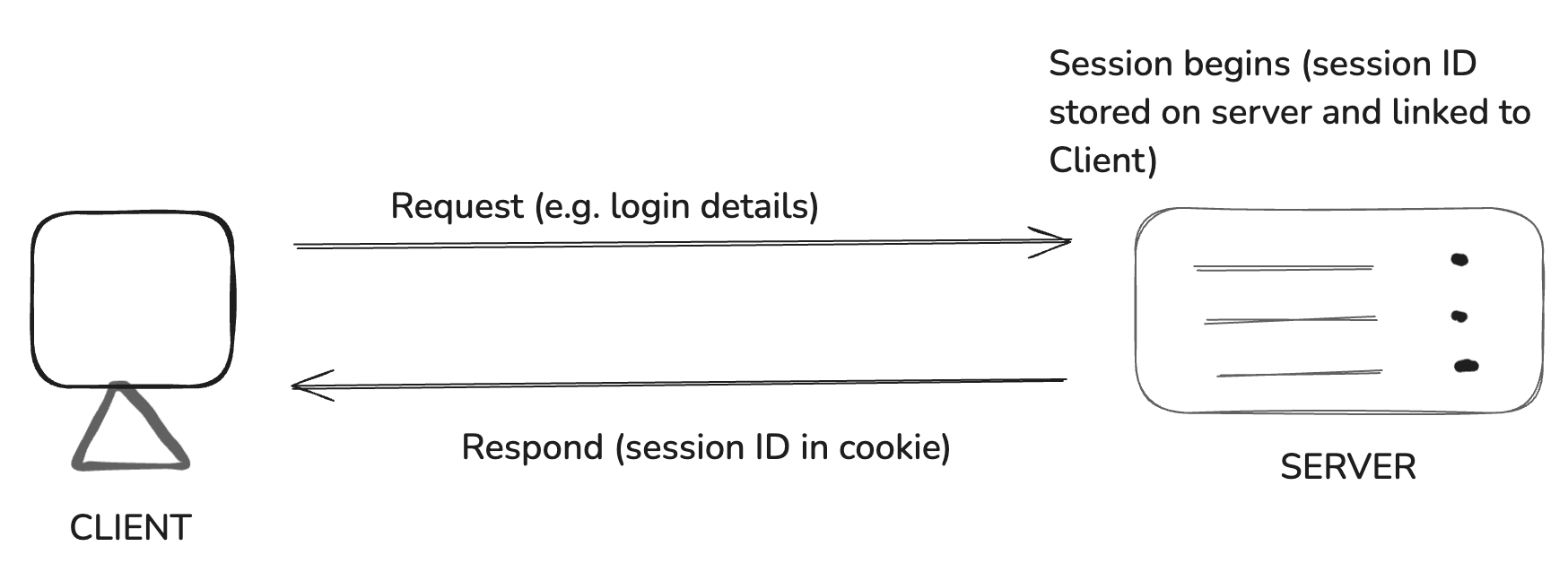
A session is used to temporarily store information on the server, allowing it to be accessed across various pages of a website. A session starts when a user logs into a network application and ends when the user logs out or the session times out. A session is like a library card that links your identity to the books you borrow. While you’re at the library, the card (the cookie) keeps track of your activity, but once you leave (or return the books), the session ends. To borrow again, you’ll need to present your card or start a new session. Here are a few examples of how sessions are used:
Language Preference: When a user selects a language for the website (e.g., English or Spanish), the server saves this preference linked to the user’s session ID. This allows the server to display the website in the chosen language without asking the user to select it again.
User Authentication: When a user logs in to access, for example, an online course, the server creates a session that contains the user’s authentication status and other relevant data (e.g., enrolled courses). The session ID is sent with every subsequent request (via a cookie), enabling the server to verify the user’s identity and grant access to their courses without requiring repeated logins.
Cookie
Cookies are small text files used to track and maintain state between the client and server in the stateless HTTP protocol. Saved on the client’s computer, they are typically 4KB or smaller and are also known as HTTP cookies, web cookies, or internet cookies. When a user visits a website, the site stores a cookie containing key-value pairs (e.g., SessionID=abc123) to manage interactions like authentication or preferences. Cookies can include optional attributes such as expiration time or domain, allowing servers to manage their behaviour and validity. A cookie is like the wristband you get at a nightclub, identifying you as a member and allowing you to enter. Once inside, your session begins, and it lasts until you leave the club or the wristband expires. If you want to start a new session, you’ll need a new wristband (cookie).
HTTP Header
HTTP headers are key-value pairs that provide extra details in HTTP requests and responses. They include metadata* about the request or response, such as content type, authentication tokens, or caching rules. Cookies are also a type of HTTP header used to store information like session IDs. HTTP headers can include various types of metadata, such as:
Client and Browser Information: The User-Agent header identifies the browser, device, and operating system making the request.
Date and Time Information: The Date header shows the timestamp of when the request or response was made.
*Metadata is “data about data.” It provides additional information or context about a piece of data, helping describe or identify it without altering the actual content.
Request - Response Model
The request-response model is a communication pattern where a client sends a request to a server for information, and the server processes and responds with the requested data. Request methods, also called HTTP verbs, define the actions performed on a resource. Common HTTP request methods include:
GET: Retrieves data from the server.
POST: Submits data to the server.
DELETE: Removes a specified resource from the server.
Response status codes indicate the outcome of these requests. Common HTTP response codes include:
200 OK: The request succeeded.
404 Not Found: The server cannot find the requested resource.
500 Internal Server Error: The server encountered an unexpected condition.
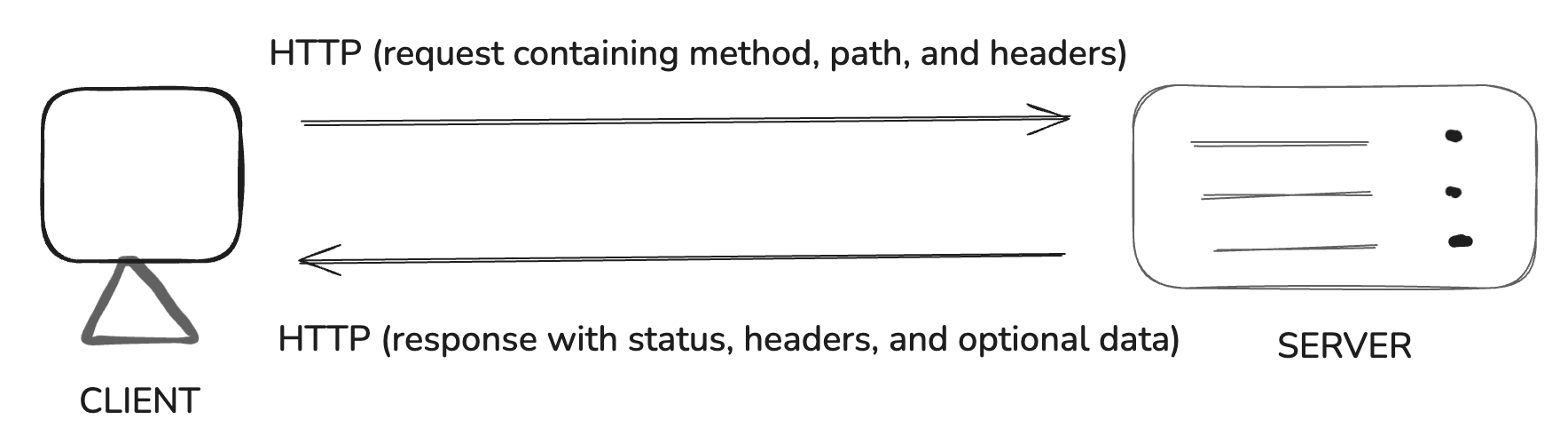
To summarize, in the request-response model, the request method specifies what action to perform (e.g., GET to retrieve information or POST to send data) and where the action should be performed on the server (e.g., the URL of the website). The server processes the request and responds with a status code that indicates whether the request was successful (e.g., 200 OK), unsuccessful (e.g., 404 Not Found), or encountered other conditions. This model enables clear communication between clients and servers, forming the foundation of web interactions.
Payload
The payload is the actual data or content being transferred in the body of an HTTP request or response. Unlike headers, which provide metadata, the payload contains the information being sent, such as form data or file uploads. For example, when submitting a form, the email and password fields are part of the payload. Similarly, in HTTP responses, the payload may include the content of a web page or API response. A real life analogy to understand payload is imagine ordering a TV to be delivered from Chandigarh to Mohali. The TV is the payload – the actual content being transported. The request includes secondary details like pickup and delivery addresses, while the response confirms the delivery status (e.g., “Delivered”) and provides additional metadata like delivery time.
Cache
It is a mechanism for storing copies of resources (like images, CSS files, or web pages) in locations like browsers or servers to improve performance and reduce redundant requests. For example, Instead of ordering the TV from a warehouse hundreds of kilometers away (the original source), you choose to get it from a nearby showroom. This saves transportation time and cost, as the TV is already stored closer to your location. Similarly, cache stores frequently accessed data closer to the user (like in the browser or a nearby server) to avoid repeated trips to the original source, reducing load time and improving efficiency.
Summary
The browser and server interact by setting up a connection, exchanging data securely, processing requests, and closing the connection after responding. This interaction is the core of how the web operates. The following is a brief outline of what we discussed in this article:
Setup TCP Connection: The browser establishes a connection with the server using TCP (Transmission Control Protocol) to ensure reliable communication.
Exchange TLS Certificate: For secure connections (HTTPS), the browser and server exchange a TLS certificate to encrypt data and ensure secure communication.
Send HTTP Request: The browser sends an HTTP request to the server, which includes:
HTTP verb/method (e.g., GET, POST).
URL (resource location).
Data (such as form data).
Additional headers and metadata.
Server Processes and Responds: The server processes the request and sends back a response. This response includes:
A status code (e.g., 200 for success, 404 for not found).
Data (e.g., images, text, or other resources).
5. TCP Connection is Closed: Once the response is sent, the TCP connection is closed, as HTTP is a stateless protocol (it doesn’t retain information about past interactions).
Conclusion
So now, having explored the importance of HTTP in the web, we’ve taken a journey behind the scenes to understand how the internet truly works; how users access websites, how data is transmitted, and the intricate processes that make it all seamless. I hope this article has introduced you to new terms, analogies, and insights that spark your curiosity and leave you even more fascinated by the wonders of the internet. The web is an incredible system, and understanding its foundations only deepens our appreciation for its brilliance.
References
An overview of HTTP - HTTP | MDN. (2024, December 19). MDN Web Docs. https://developer.mozilla.org/en-US/docs/Web/HTTP/Overview
The Editors of Encyclopaedia Britannica. (2009, March 12). HTTP | Definition, Meaning, Versions, & Facts. Encyclopedia Britannica. https://www.britannica.com/technology/HTTP
GeeksforGeeks. (2024, July 23). Difference between Session and Cookies. GeeksforGeeks. https://www.geeksforgeeks.org/difference-between-session-and-cookies/
Usage Statistics of HTTP/2 for websites, January 2025. (n.d.). https://w3techs.com/technologies/details/ce-http2?
Establishing a SSL/TLS session - Transport Layer Security | Okta Developer. (n.d.). https://developer.okta.com/books/api-security/tls/how/
Zire Media. (2017, January 16). Optimizing your website with HTTP/2. https://ziremedia.com/optimizing-your-website-with-http2/